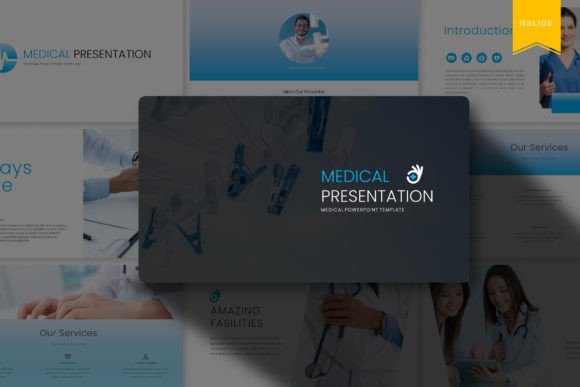
Medical Google Slides Template: A Designer's Toolkit for Clarity
Creating a presentation for the medical or healthcare sector is a unique challenge. You're not just sharing data; you're communicating complex ideas, building trust, and often dealing with sensitive information. The visual framework needs to be impeccable—professional enough for a boardroom, clear enough for a patient education session, and engaging enough to hold an audience's attention. This is precisely the gap the Medical Google Slides Template is built to fill. It's more than just a collection of slides; it's a structured design system for healthcare communication.
Visual Style and Professional Appeal
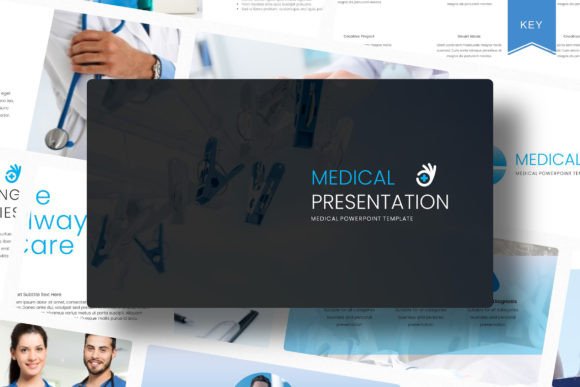
At its core, this Medical Presentation Template embodies a clean, modern, and authoritative aesthetic. The design language leans into ample white space, creating a sense of calm and order that's crucial in medical contexts. You'll find a thoughtful color palette—think calming blues, greens, and neutral tones that evoke trust and professionalism, all easily customizable to match specific brand guidelines. The typography is chosen for maximum legibility, pairing clean sans serif fonts for body text with strong, clear headings. This isn't a flashy, trend-driven style; it's a timeless foundation designed for credibility.
The personality of the slides is one of precision and clarity. Every element, from data visualization charts to timeline graphics, is crafted to make complex information digestible. The overall appeal is one of organized confidence. It tells your audience, before you even speak, that the content has been prepared with meticulous care. For a designer or a small business owner in the wellness or health-tech space, this provides an instant upgrade in perceived professionalism.
Practical Applications: Beyond the Hospital Boardroom
While its name suggests a specific use, the versatility of this template system is a significant strength. Its clean, structured framework is ideal for a range of projects far beyond a typical hospital presentation. Consider these real-world applications:
- Client Pitches & Proposals: Entrepreneurs and consultants can use the polished, animated slides to pitch health-tech startups, pharmaceutical research, or wellness services to potential investors or partners.
- Educational Content & Workshops: Bloggers and content creators in the health and fitness niche can transform their advice into visually compelling slide decks for online courses, webinars, or downloadable lead magnets.
- Internal Training & Onboarding: Small business owners can create professional training materials for staff, ensuring consistent and clear communication of protocols and procedures.
- Conference & Seminar Talks: Marketers and speakers can build a standout presentation that maintains audience engagement through its smooth animations and logical flow.
The key is recognizing that the template provides a design asset for structured communication. Its 16:9 widescreen ratio is standard for modern displays, and the fully animated transitions add a layer of polish without being distracting, guiding the viewer's eye through the narrative.
Maximizing the Template's Potential
To get the most out of this resource, think like a designer, not just a content filler. Start by exploring the 68 total slides and identifying the core layouts that match your content pillars—data slides, team bios, process flows, and quote slides. The drag and drop image functionality is a huge time-saver, but always source high-quality, relevant imagery. The note about Unsplash images is a helpful reminder to use licensed visuals.
The theme colour option is your most powerful tool for brand identity integration. Don't just change the primary color; adjust the entire palette to ensure harmony. Use the fully editable nature of the shapes and text to refine the visual hierarchy. Make sure your key message pops by adjusting font sizes and colors within the provided framework. For those pairing this with other materials, consider how the clean sans serif style here might complement a more distinctive display font or serif font used in your logo or print materials, creating a cohesive font pairing strategy across all touchpoints.
Choosing and Implementing with Confidence
When evaluating if this Medical Google Slides Template is the right fit, consider your audience and platform. For digital sharing via Google Slides, the live collaboration features are perfect. The included .PPTX file ensures compatibility with PowerPoint, which is essential for many corporate environments. The documentation file is a critical inclusion—review it to understand the full scope of customization and any specific instructions.
Always test the template with your actual content before committing. Paste in a sample text block to check readability at different screen sizes. Experiment with the easy and fully editable shape colors and positions to create a unique layout that still feels cohesive. Remember, the goal is to use this premium foundation to elevate your message, not to be constrained by it. By approaching it as a professional toolkit, you can craft presentations that are not only beautiful but also clear, effective, and perfectly aligned with your communication goals.